BackAsk ResearchPalâ Online · Ready to help
Ask or share your thoughtsâ¦


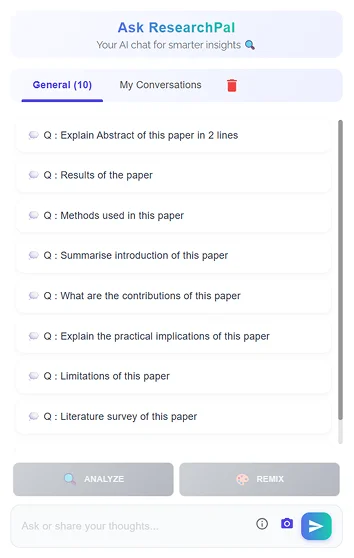
You don't have to know exactly where an answer is located before you start. Simply ask a question about the research paper and use the conversation to explore the document.
Ask Predefined Questions About Your Research Paper
Ask Custom Questions About Your PDF
You can also ask your own questions instead of relying only on predefined prompts. Ask about a specific concept, argument, research method, finding, result, dataset, section, or terminology within the document.
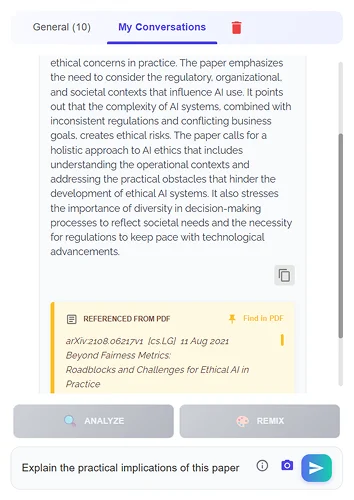
Getting an answer is useful. Knowing where that answer came from is even more important for research.
ResearchPal connects responses to relevant text from your PDF so you can understand the context behind the answer. When you need to verify something, use Find in PDF to locate the relevant text and review the original passage.
A long research paper doesn't always need to be read from beginning to end before you understand its main idea. Use ResearchPal to ask for summaries and explore the key information contained in your PDF.
Understand the paper before spending hours reading every page.
Academic PDFs often contain technical terminology, unfamiliar concepts, complex methodologies, and detailed explanations.
Instead of repeatedly rereading difficult sections, ask questions about the content you don't understand.
Explain Difficult Concepts in Your PDF
Finding one specific piece of information in a long research paper can be frustrating. Instead of scrolling through dozens of pages, ask a targeted question about what you're looking for.
Chat With PDF helps you explore relevant information conversationally, making it easier to locate important topics, sections, findings, and explanations within your research document.
Getting started with ResearchPal Chat With PDF is simple.
Create your free ResearchPal account or log in to your existing account.
Add your research paper or supported PDF to your ResearchPal library.
View your PDF alongside the conversational interface.
Choose a predefined question or type your own about the document.
Ask more questions when you need clarification or detail.
Use source references and Find in PDF to locate the original text.
Built around research workflows, making Chat With PDF particularly useful for exploring academic papers and research documents.
Go beyond basic summaries — ask about objectives, methodology, findings, limitations, contributions, and implications.
Connect answers back to relevant information in your document so you can review the original context.
Start with research-focused prompts or ask your own questions based on what you want to understand.
Find relevant information through questions instead of manually searching through every page.
Keep the conversation going when you need clarification, context, or a deeper explanation.
Explore research papers, understand methodologies, identify findings, and investigate limitations before a deeper review.
Understand difficult academic papers, simplify complex concepts, summarize sections, and explore unfamiliar terminology.
Review research documents more efficiently by asking targeted questions and checking answers against the original paper.
Quickly explore papers, identify relevant information, understand contributions, and determine which need closer examination.
Make lengthy research documents easier to explore when discussing studies, findings, methodologies, or supporting evidence.
A research paper doesn't have to be something you simply scroll through. With ResearchPal, you can interact with your PDF through questions, summaries, explanations, and follow-up conversations.

Research papers can contain dozens of pages of methodology, results, tables, limitations, references, and technical explanations. Finding one specific answer manually can take considerable time.
ResearchPal's AI Research Assistant makes this process more conversational. With Chat With PDF, you can interact with your research document and ask questions about the material instead of repeatedly searching through pages.
You can investigate the research design, methodology, methods, findings, limitations, contributions, and practical implications contained within a paper.
What can you ask the AI Research Assistant about a PDF?
This makes the Agent particularly useful when you need to understand a paper rather than simply summarize it. Upload your research PDF, explore its content, and continue the conversation as new questions arise.
Try ResearchPal's AI Research Assistant to turn static research documents into an interactive research experience.
Discover the rest of ResearchPal's AI-powered research and writing tools.
Literature Review
Generate structured literature reviews by simply entering your research topic or question. ResearchPal searches across millions of academic papers, synthesizes findings, and produces citation-backed content ready for your research workflow.

Generate Review
Search Papers
Discover relevant research papers using intelligent, domain-specific search across millions of academic sources. Save papers, explore citations and references, and build your research foundation faster.
Discover Papers
Connected Papers
Explore how research papers connect through citations, references, and shared topics using an interactive visual graph for deeper discovery. Navigate research relationships, uncover trends, and find relevant papers faster.
Explore Graph
Analyze & Remix Within PDF Chat
Screenshot any figure or visual from your PDF and let ResearchPal analyze, explain, and redesign it into clean, high-quality visuals using AI. Turn research visuals into presentation-ready graphics in seconds.
Analyze Visuals
Paper Insights
Analyze research papers and extract key information such as methodology, findings, limitations, and contributions. Compare multiple papers and generate structured insights to accelerate your understanding.
Extract Insights
Citation Generator
Generate accurate academic citations using URLs, DOIs, titles, or identifiers. Convert citations into multiple formats and save them directly to your research workspace.
Generate Citations
Citation Management
Store, manage, and format all your citations in one place. Automatically save citations from essays, literature reviews, uploads, and citation generation.
Manage Citations
AI-Powered Editor Tools
Enhance your writing directly inside the document editor with context-aware AI tools designed for academic writing.
Enhance Writing
Paraphraser & Writing Enhancer
Improve your academic writing with AI-powered editing tools including paraphrasing, summarization, tone adjustment, and translation.
Refine Text
Research Library & Integrations
Upload, organize, and import research papers from multiple sources including Zotero and Mendeley. Access files, extract insights, and manage your research in one centralized library.
Organize Library
Essay Writing
Generate structured essays with headings, citations, and customizable formats. Define topic, essay type, and length to instantly create well-structured academic content.
Write Essay